
A grammatical analysis of Russian email spam
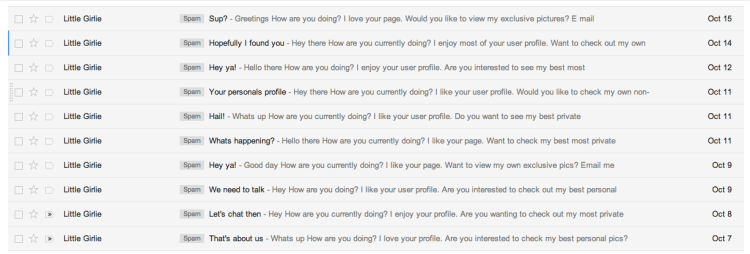
As part of my recent migration from Gmail to FastMail, I’ve been going through my Gmail Spam folder to check for any non-spam emails that were mistakenly filtered away. In doing so I noticed the following set of emails:
Here is an example of what one of these emails looks like:
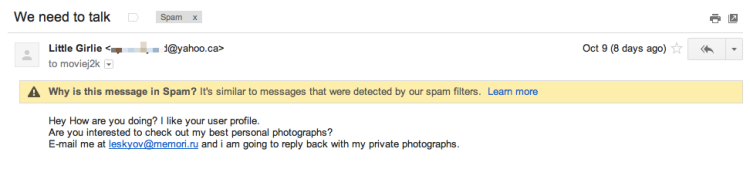
These emails are all slightly different, but follow a very similar format:
- All but one comes from — what I imagine to be real — Yahoo! accounts, that have probably been hacked.
- They all ask me to reply to a variety of Russian-based email addresses.
- They all use a series of similar phrases to try to engage with me
It is the last point that amuses me. The ‘little girlie’ who sent these emails uses the following variations to tempt me to reply to her:
“I love your page”
“I enjoy your user profile”
“I like your user profile”
“I like your page”
“I enjoy your profile”
“I love your profile”
And it almost worked. I was just about ready to reply — and hand over my credit card information for good measure — when I noticed this email:
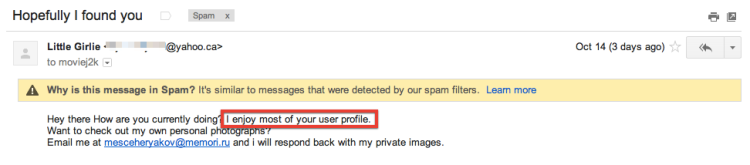
“Most”?!? You only enjoyed most of my user profile? If you are trying to tempt me (and scam me in the process), you’d better work on your flattery skills.
Migrating from Gmail to FastMail: part 3
I promise that I will get around to explaining the gory details of my Gmail to FastMail migration (and also how I’m finding FastMail as a service), but one final post before then. This time I want to talk about ‘preparation’.
If you are thinking of taking FastMail for a test drive, you can of course do this as a 60 day free trial (no credit card needed as well[1]). If you do this, then you don’t need to do much preparation other than set Gmail to forward your email (and keep a copy in the inbox or Archive folder):

Something else to bear in mind is that Gmail applies spam filtering rules before email gets forwarded. I’ve had issues where Gmail routinely flags some emails as spam (even though I’ve set up filters to tell it not to[2]). This is where I’ve found the SaneNotSpam tool by SaneBox to be really useful.
Michael Crusoe gave me a useful tip on twitter about this. Simply make a filtering rule in Gmail to forward all spam email. I did something slightly different and made a rule to not move any email to the Spam folder[3].

If you set up forwarding like this then you can continue using Gmail as before, but everything will also end up in FastMail. To be able to send from your Gmail address within FastMail, you’ll need to set up a Gmail personality. FastMail also allows aliases, but these differ somewhat from personalities[4].
Go on a Gmail diet
My final preparation tip — for those who are considering a permanent migration to FastMail — would be to slim down your Gmail archive. The much-touted advantage of never needing to delete emails when using Gmail is great…except for when you want to switch providers.
Although FastMail has a decent IMAP migration tool, it can take many hours to migrate thousands of emails (and I’m assuming that most Gmail users have thousands, if not tens of thousands, of emails). When I first started thinking about leaving Gmail (over a year ago now), I realized that I should probably start slimming down my Gmail archive[5].
It wasn’t until I completed the migration to FastMail that I realized that Gmail’s Archive folder also contains all of your sent mail. Initially I thought that the FastMail migration tool had made an error because I was missing about 6,000 emails. Turns out these were all of my sent messages, which FastMail — like other email providers — only keeps in the Sent messages folder.
Coming next
In part 4 I will explain a bit more about how the actual migration went for me, and what other things I needed to do in order to use my custom domain with FastMail.
-
I wish more services would let you try them without having to hand over credit card details ↩
-
In particular, emails from Amazon often end up in my Gmail spam folder. ↩
-
Though this is only catching spam email that is directly addressed to me. I’m still seeing some spam email where I’m presumably bcc recipient. But I can live with this. ↩
-
I now have a personality in FastMail for each account that I want to be able to send email from. ↩
-
Over the course of the last year, I’ve shed about 3,000 emails from my archive. This might seem like a lot, but my starting point was about 18,000 emails so I’m not sure how much time this saved me during the actual migration. ↩
Migrating from Gmail to FastMail: part 2
In my last blog post, I explained the complexity of my email setup before I began the migration from Gmail to FastMail. Although I will move on to explaining how I did the migration, I thought I should briefly touch on why I did it.
Gmail is powerful, full-featured, very robust, and most importantly…it is free. Why would anyone want to move away from this premium email service?
Support
When you don’t pay for a service or app, you can’t necessarily expect any problems you encounter to be dealt with any sense of urgency. It is true that Gmail doesn’t exactly break very often, but what if you needed help or feedback on a particular issue that might only be of relevance to you? If you pay for a service like FastMail, then you get fast and effective support [1].
Privacy and security
It is no surprise that Google’s business model relies on advertising. They not only want to generate revenue by putting ads across all of their products, they also want to benefit from all of the information that they have gleaned about their users.
Although you may never notice or care about the personalized adverts that can appear in Gmail, since last March Google has effectively started sharing your personal data across all of their products and services. Although their privacy policy initially suggests that they do not share this information without your consent, they allow sharing to ‘affiliates … and trusted businesses’ for the vaguely defined category of ‘external processing’:
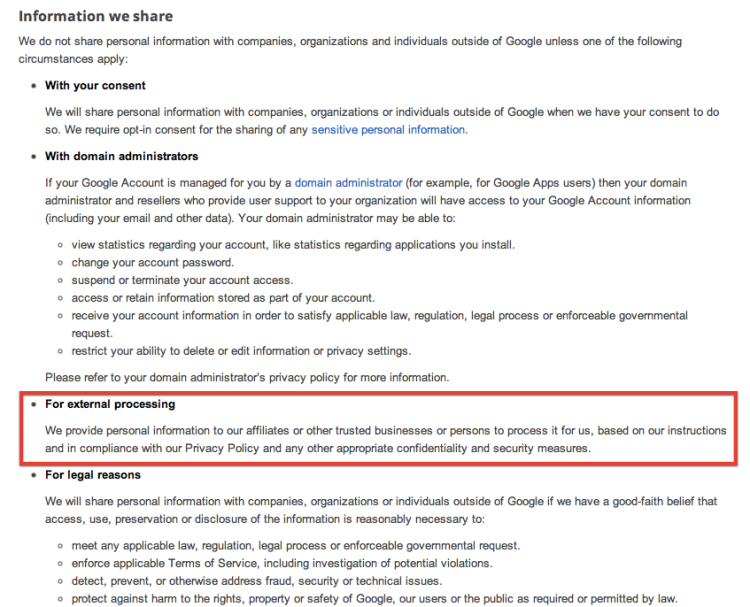
Privacy concerns such as this are among the chief criticisms of Gmail.
The future
Google experiments with lots of different products and increasingly they are honing down their portfolio to a smaller number of (revenue-generating) services. They have discontinued more services than most companies will ever launch. Many of these are products that you will have never heard of, but closure of services like the popular Google Reader sparked outrage across the web[2].
Although it seems unfathomable that Google would kill off Gmail, it can’t be assumed that Google will not introduce changes that limits the functionality of Gmail or annoys users in other ways (e.g. more ads).
FastMail
Companies that charge a fair price for a service can use their revenue to provide you, the user, with all the support and help that you need. They also don’t need to look at your emails to mine personal information for the purpose of selling you stuff.
Also, companies not based in the USA may not have to hand over their data to organizations like the NSA [3].
-
I’ve already had my first FastMail support request submitted and dealt with…all within 24 hours. ↩
-
Though if you don’t pay anything for a product, I’m not sure that such outrage is justified? ↩
-
FastMail is an Australian company and have been very upfront about where they stand with respect to situations such as NSA requests for information. This is not a big reason why I have switched to FastMail, but I appreciate their openness on the matter. ↩
Migrating from Gmail to FastMail: part 1
I have recently migrated my email setup from Gmail to FastMail. This has not been as simple as moving a single email account from one provider to another, so I thought I’d write about my experiences of getting setup with FastMail.
Before I address the question of why I wanted to move away from Gmail, I thought I would first explain my email setup. In future blog posts, I’ll cover the minor hiccups I’ve had as I’ve switched to FastMail and will also talk about my overall experience of FastMail.
My email setup: the early days of relative simplicity
Like nearly everyone on the Internet (or so it seems), I’ve had a Gmail account for many years. This has not always been my primary account though and I’ve had an Apple-related email service ever since the days of iTools and .Mac. And of course I’ve also had a work email account plus other unwanted-but-necessary email accounts[1].
For a long time, I had these three main accounts (Apple, Gmail, and Work) all connected to my main Mail client (Apple Mail on Macs) as separate accounts.
My email setup: getting more complex
About the time I bought an Android phone[2], I started using Gmail more and more. So that was when I decided to redirect all of my Apple email to Gmail. If you didn’t know, one of the great things about Gmail is that you can connect other accounts to it and send email through Gmail but make it appear that it comes from those other accounts (go to Settings->Accounts):
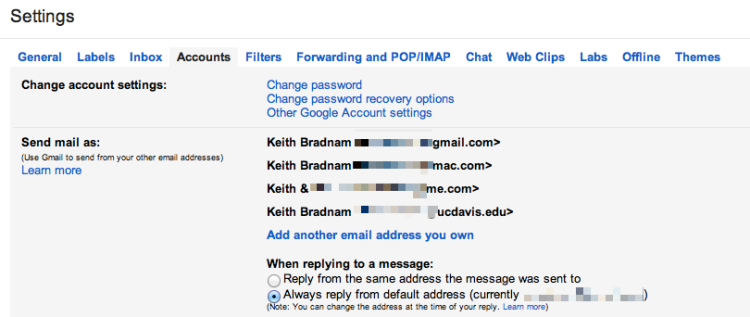
You can even do this for email aliases. My Apple email account lets me set up a few free aliases. This allows me to have one email address that I can use for me and my wife (emails to this account go to me, but get autoforwarded to her[3]). So my Gmail account contained four accounts at this point.
My email setup: fewer accounts, but more complexity
The above configuration works well when using Gmail’s web interface, but initially I thought I had to keep my Work and Apple accounts in my desktop Mail app for those occasions when I wanted to send an email from my Work account. But it turns out, you can have one Gmail account in Apple’s Mail app, and still send from different accounts. You can also do this is in iOS, though you paradoxically have to set up your mail as a non-Gmail account.
My email setup: even more complexity
For a year or so, I was happy with my email setup. Everything was routed to one place (Gmail) but on my Mac or iPhone I only needed to have one account set up and yet I could still send email from my Work or Apple email accounts (including aliases).
At some point though I realized that I might not be with Gmail forever. So I decided to invest in a domain name which, in theory, would stay with me forever and would give me the opportunity to have a stable email address for the rest of my life. This email address could be moved between providers as and when I needed to move.
So I bought a domain name with the awesome Hover registrar (please click here to use my referral link if you consider using them). For $5 a month, Hover will forward email from your chosen email address (e.g. greedo@mos-eisley-cantina.com) to another address. So while I could have used Hover as the email host, I decided to stick with Gmail and just forward email to it as before.
So how did I end up being able to send from my new address (greedo@mos-eisley-cantina.com[4]) from within Gmail or Apple’s Mail clients? Well in Gmail, you can add other accounts to your account and either treat them as an alias or make them the default account:
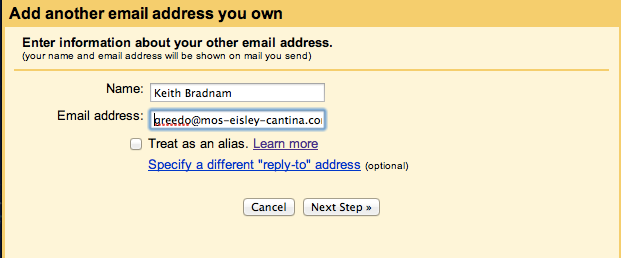
So in my case, I made greedo@mos-eisley-cantina.com the default email address associated with my Gmail account. Setting this alias to be the default email address for your Gmail account in Apple’s Mail clients is trickier, especially on iOS. But it can be done.
Moving on
Over the last few days I have finally decided to leave all of the above setup behind and move to FastMail. Why and how I did this, will be the subject of future blog posts in the coming days. However, my early experience is that FastMail is excellent and I have no regrets about making this move.
-
Comcast (my ISP) required me to setup an email account. I never use this but forward the billing-related email announcements on to my main accounts. Also, I have a Yahoo email account which is solely because of the Fantasy Football league that I play in. ↩
-
My Android experience lasted about a year, I’m now an iPhone user ↩
-
You can setup a filtering rule in Gmail to do this ↩
-
This is not the address I am using! ↩
A new type of email annoyance, it's not quite spam or bacn, but what is it?
I understand that companies want to keep in contact with their customers. But the volume of email a company sends should hopefully be proportional to how often you purchase, or use services, from that company. An email every few months is one thing. When you start emailing every few weeks, it becomes bacn, and when you email me every week it is spam and I will delete it, ignore it, or unsubscribe from your emails.
Recently, I've been getting a lot of emails that look like this one:
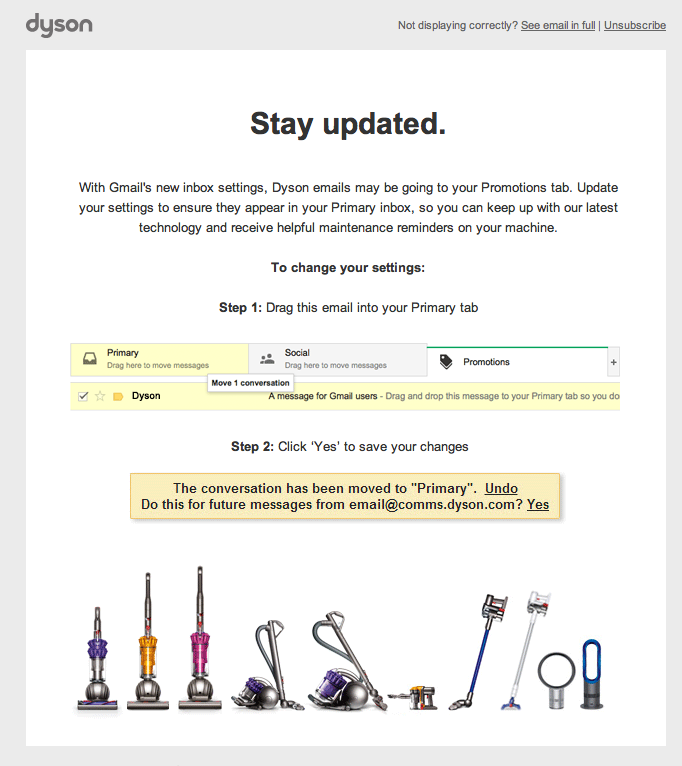
Ever since Google rolled out their new inbox for Gmail, some companies have started to worry that we might not giving their emails the amount of attention that they would prefer. If I were in charge of a company's email strategy, I would let the customer make their own mind up as to whether the email was important or not. I would not send the customer even more emails to tell them how to prioritize the emails that the company sends.
A name is needed for this annoyance. How about 'facn' for fake bacn?
Thinking of migrating your older Squarespace sites to Squarespace 6? A cost-benefit analysis
I have been using Squarespace for a few years now to host the few websites that I maintain. Last July, Squarespace released the latest version of their software: Squarespace 6 (which I will refer to as ss6 from now on). While I mostly prefer the changes that have been made in ss6, I've put off migrating all of my sites. This is partly through laziness, but partly because I've been confused as to how the pricing differences with Squarespace 5 (ss5) will affect me.
Luckily, Squarespace has fantastic support, and so I emailed them and they revealed all. I thought that others, who are also thinking of migrating, might find their answers to my questions useful. My original email is below, and I've interspersed their answers. A brief summary follows that.
My email exchange:
Background
Currently I have one master Squarespace 5 (ss5) account, two Squarespace 5 sub-accounts, and one Squarespace 6 (ss6) account that — if I understand this correctly — remains free while connected to my master ss5 account. I also have plans to start a fifth Squarespace site and trying to decide whether to migrate any or all of them to ss6 is the cause of my confusion. So here are my questions:
Question 1
With the 15% discount I get for the three ss5 accounts, this currently costs me $25.50 per month (the ss6 account remains free). If I migrated all accounts to ss6, would this end up costing me a flat fee of $8 per month (standard accounts, billed annually) for each account? I.e. a total cost of $32 for the current accounts I own ($40 if I create a new ss6 account)? I haven't seen any mention of discounts for managing multiple ss6 accounts.
There are not any special discounts for multiple sites associated with the same email address. You will need to upgrade each account individually. Also when you pay for an annual account you pay for the whole year right away totaling to $96 per account
If you decide to go for monthly billing you will be paying $10 per month
You can refer here form more information on our paid plans: http://help.squarespace.com/customer/portal/articles/1257605
Question 2
Under ss6, I understand that all accounts can be tied to a single email address which is fine, but is all the billing centralized as well, or would this be 4 or 5 separate payments off of my credit card?
All of you accounts would be billed separately
Question 3
If I went ahead and migrated everything to ss6, I guess I'd have to start with my master account. So I assume that initially I'd create a new ss6 account (which would have to have a new name?) and then I would import the ss5 content to it and finally redirect my domain name to the new site. Once I have the new ss6 master account I could connect other ss6 accounts to it, but my one current ss6 account is tied to my ss5 master account. The question here is whether everything will be okay if I disconnect the current ss6 account from the master ss5 account and then reattach it to the new master ss6 account?
There is no such thing as a master account within V6. All Squarespace 6 sites are managed individually. You are, as mentioned earlier, able to have several sites associated with the same email address.
When you unlink your Squarespace 6 site from your old Squarespace 5 account it will now function as its own independent site. You will not need to link it to anything else
So the bottom line is that Squarespace 6 removes the concept of centralized billing for multiple accounts. So this also means no multiple account discount. Without that discount, ss6 sites are 50 cents cheaper per month than ss5 (assuming you pay for a year at a time). But, I currently have one free ss6 account which would no longer be free if I get rid of the ss5 sites.
So if I moved my three current ss5 sites to ss6, I'd end up with four ss6 sites which would work out to $32 per month...a ~25% increase on what I currently pay. Hmm, still not sure whether the extra features in Squarespace 6 will tempt me to switch.