This is a rare blog post that’s adapted from something that I wrote for our intranet at work.
If you help manage digital communications channels (websites, social media, bulk email platforms, etc.), you will frequently end up needing to find a suitable image to use. It might be a generic image that can broadly illustrate the theme of whatever you are posting (e.g. something to represent ’success’), or maybe it needs to be incredibly specific (e.g. you’re writing about some specific medication).
You might have questions about which images you can use. Maybe you feel like asking…
Can I just use any image that I find on the Internet on my website?
To which I would reply: ‘almost certainly not’. Images online will mostly be copyrighted.
But I found an image being used on an American government website which had a caption implying it was free to reuse. So that must be okay?
Sadly, the answer is again 'no'. Copyright laws vary internationally. In this case, US federal government images might be in the public domain within the USA, but not elsewhere.
Okay, so what about an image I found on Wikipedia, they must be free to use right?
Possibly, sort of, maybe. Some of the images that you might see on a Wikipedia page (as well as its sister site, Wikimedia Commons) will be public domain images. But many (possibly most) will typically be licensed for use and the terms of the licence will determine what needs to be done before you can use the image.
For example, if you click on an image in Wikipedia you might see details of a Creative Commons (CC) licence. It might look something like this:
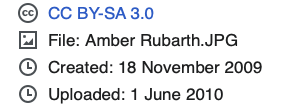
The letters after CC all have very specific meanings which determine how you can use the image. These include:
BY = Attribution - you must give attribution to the image owner (e.g., next to or below the image)
SA = Share Alike - you can use and edit the image, but you must share the edited version with the same Creative Commons licence so that others know that they can use it.
NC - Non Commercial - you can't use the image in a way where you are making money (selling a product, or possibly even promoting a paid event)
ND - No Derivatives - you can't edit or 'remix' the image at all; it must be presented as you found it.
Great. I found a suitable CC BY-SA image on Wikipedia, and if I add it to my website, I can add attribution and the licence details below. That's all good right?
Umm. Look I know this is not what you want to hear but this still has the potential to cause issues. Although you might add an image and correctly provide attribution, once the image is on your website any other users of your website might have access to it.
This will be true for any digital platform that you use which has other editors. The risk is that someone might add the image to a different webpage and not realise that this is a Creative Commons image. So they might use it without adding the necessary attribution details (which breaks the terms of the licence).
The risk greatly depends on a) how much metadata you can add to images stored on your website and b) how much other users will notice that metadata. Regarding the first point, Squarespace’s Asset Library allows you to provide a filename but no other metadata at all:
So if I gave access to someone else to work on my website, unless I somehow flagged which images had licence restrictions in the filename, it would be easy for someone else to inappropriately reuse an image.
You are such a killjoy Keith. Okay then I found this site called Pixabay which says it has "stunning royalty-free images". Job done!
Not so fast. Pixabay (and many other sites like it) rely on people uploading their own images and letting others use them without attribution. However, there is no way of guaranteeing that all images were taken or created by the uploader. It's possible that someone uploaded a copyrighted image and claimed it as their own.
I admit the risk of this is probably really low and on my own websites, I have frequently made use of sites like Pixabay and Unsplash for images. Using such images might depend on how risk averse you are and what type of website you are using the images on.
You're making my life so hard Keith. I have now taken a picture on my own phone. I therefore own the copyright and so there can't possibly be a problem with using this image?
You'd think so, but sadly this is a 'maybe'. Does the photo you have taken feature any identifiable person? If so, then you probably shouldn't use it without gaining consent from the individual.
You also shouldn't use any photo which could potentially lead to legal action taken against you or your organisation, e.g. if you took a photo of someone drinking wine and then used that on a web page about alcoholism, this could cause the person real distress and possibly lead to legal trouble.
You're killing me Keith. I'll use an AI-generated photo instead.
You might be okay, but now the risks are different. It is very unclear as to who ‘owns’ AI-generated images and in some cases there are ongoing lawsuits over images that clearly resemble existing intellectual property.
More generally, I would avoid a lot of AI-generated images because they can also look ‘off’ or a bit unusual in ways that it is not always easy to put into words.
But look, what's the worst that can happen by using an image I found online? It's just one image, no-one will notice.
Depends on how deep your pockets are. In one legal case (Tipping v Smith), the claimant was awarded £56,850 in damages for their images being used on social media. This is for repeated use of photographs without a licence, but standard breach-of-copyright fees can still be anywhere from several hundred to a few thousand pounds.
It's just not a good idea to ever use images which you are not explicitly licensed to use (or where you can't guarantee that you can display the relevant licence next to all uses of an image). Sites like Pixabay do grant a licence, but it's only as reliable as the uploader's right to give it, so it’s a low but non-zero risk.
Copyright enforcement agencies like Pixsy operate on a ‘no win, no fee’ basis and AI is increasingly making it easier for such agencies to find copyright infringements (PicRights, for example, uses its own image recognition technology to find matches). Pixsy keeps 50% of the recovery fee if they are successful so it is probably a good business to be in.
This sucks. I guess I can't use any image then? I'll make a page full of plain text which won't be any fun at all. Thanks a lot Keith.
Hold on! I never said you can't use images. There are genuinely great images that are in the public domain and don't need attribution. Some of these will be on Wikipedia and might have a 'CC0' licence, but there are many other sources of legitimate public domain images online.
Creative Commons-licensed images are a really good solution if you can guarantee that you will always be able to provide the necessary attribution alongside all uses of the image. Flickr has a great set of such images.
For scientific images, the Wellcome Collection has over 60,000 images in the public domain.
Kagi and other search engines will let you apply a filter for their image search to only show public domain images:
This page on Wikimedia Commons lists many other sources of public domain images.
You can of course always pay to use a stock photo service and/or license individual images for use on your website. For an image that is important for your needs, this should always be an option you consider.
A final piece of advice is to consider approaching the owner of a website where you have found a potentially suitable image. If that image is clearly owned by the owner of that website and if you are not planning to use it to make money from, they might be fine with its reuse.