
7 reasons why I don't like content 'aggregators' who scrape blog sites
Today a post on twitter drew my attention to Bioinfo-Bloggers, a site that aggregates content — i.e. the full blog post is reproduced — from 28 different bloggers who write about bioinformatics and genomics.
Outwardly, this might seem like a good idea. The bloggers get more exposure to their material, and readers can visit just one site instead of 28 separate RSS feeds. However, there are several reasons why I have issues with this type of aggregation. Many of my concerns apply even when individual bloggers have expressly licensed their material for reuse (e.g. by use of a CC0 Creative Commons license).
- The site lists the 28 blogs as 'contributors' and lists the blog writers as 'authors'. This strongly suggests that the people in question have consented to their material being used, even when this is not the case.
- Links to the original blog posts are included, but only at the end of each reproduced entry. The included text says that 'This is a syndicated post', further suggesting that the original authors agreed to have their content syndicated.
- The Bioinfo-Bloggers website asserts copyright over all material (see footer section of website).
- The original bloggers lose web traffic. This can matter for minor reasons such as when you want to include details of how popular your blog is for outreach sections on research grants. But it potentially — depending on how much traffic Bioinfo-bloggers gets — deprives you of knowing who is looking at your content, which articles are more popular, etc.
- People don't a chance to comment on your blog (unless they follow the links). You may lose some direct engagement with your readers.
- If people start using this site rather than viewing your blog, what happens if Bioinfo-Bloggers stops including your blog site, or shuts down altogether? In the former case, people might just assume you are not posting any more.
- What happens if Bioinfo-Bloggers starts including content from other blogs that you don't approve of? Your blog post may appear alongside another which espouses views you find offensive.
The first three points could easily be addressed by removing the claim of copyright over all material, by making it explicit that this site is just scraping other sites and that the original bloggers may not be aware of this, and by placing links to the original blog content at the top (not bottom) of each article.
There are currently some ongoing discussions about this on Twitter. E.g.
.@kbradnam *shrug* coming from open source, you sort of get used to stuff being used however. Relevance > details for me. YMMV!
— Titus Brown (@ctitusbrown) November 5, 2013
@BioMickWatson @kbradnam @ctitusbrown @BioinfoBloggers - lower left hand side "Copyright © 2013 Bioinfo-Bloggers. All Rights Reserved"
— Casey Bergman (@caseybergman) November 5, 2013
Bacon, bacon, bacon: a bacon extravaganza
Today I cooked a three course meal with every dish featuring bacon. This was a special treat for some dear friends of ours who will sadly be leaving Davis after many years here. One friend has always made it clear to us that she loves bacon, so I thought I would cook her a meal to remember.
The appetizer — for which I stupidly forgot to take a picture of — was Bacon Cheddar Deviled Eggs. The bacon was cooked on top of a wire rack in the oven (to try to reduce the fat content a little bit). I used an English mustard (Colman's) which has quite a tang. Eggs were served with a few cherry tomatoes on the side that were drizzled in olive oil and served with a large drop of a local Black Currant Balsamic Vinegar.
The main course was a bacon-wrapped cheddar and stout meat loaf (my first time ever cooking meat loaf). The organic beef was grass-fed and from a local source.
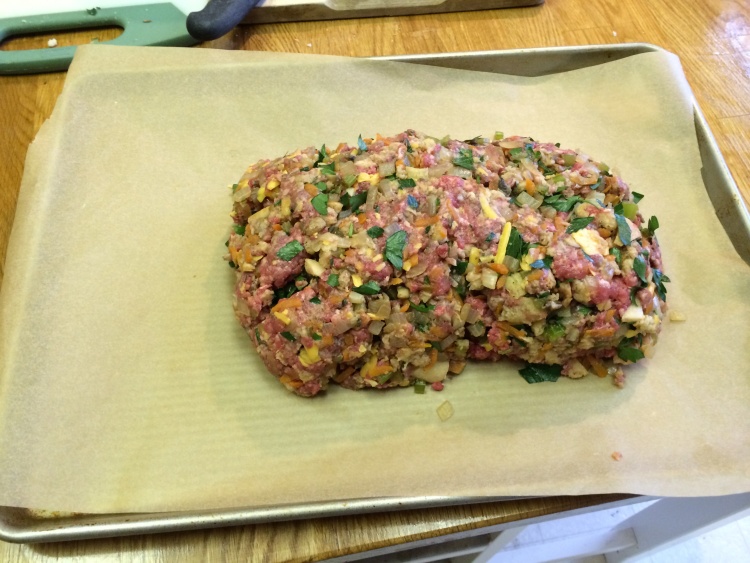

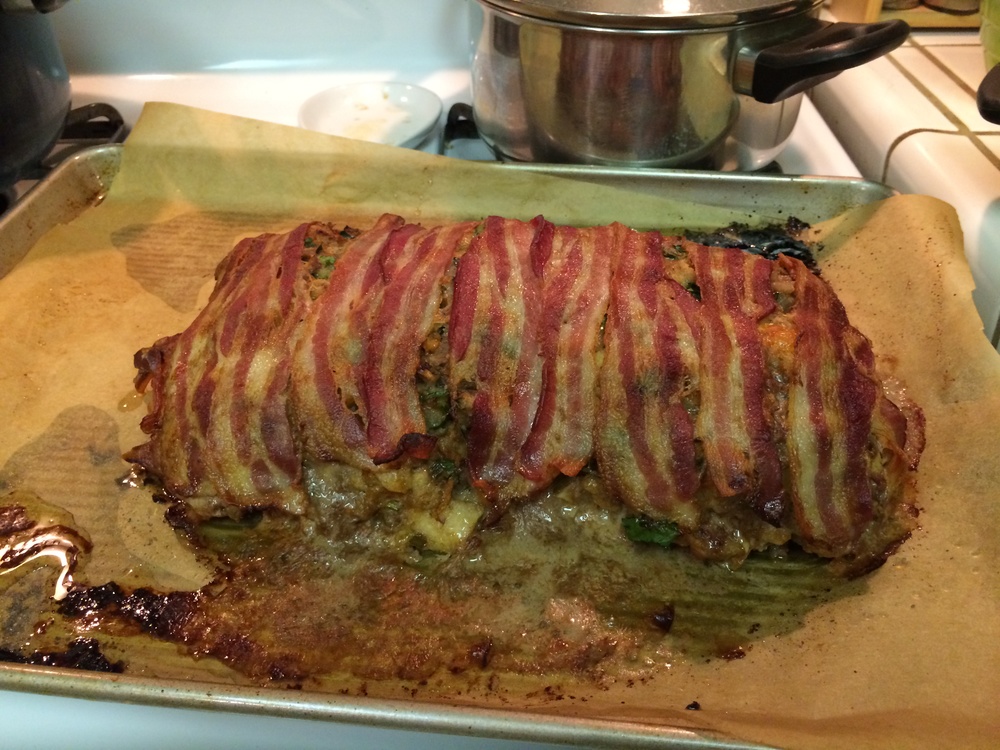
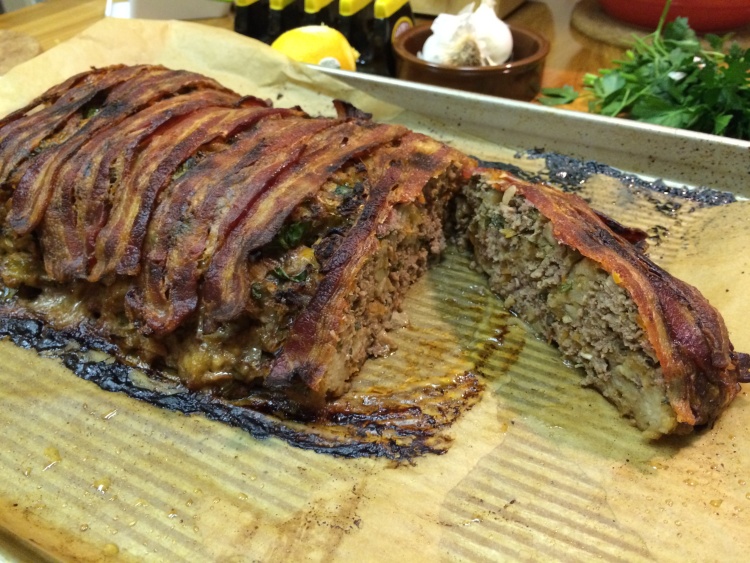
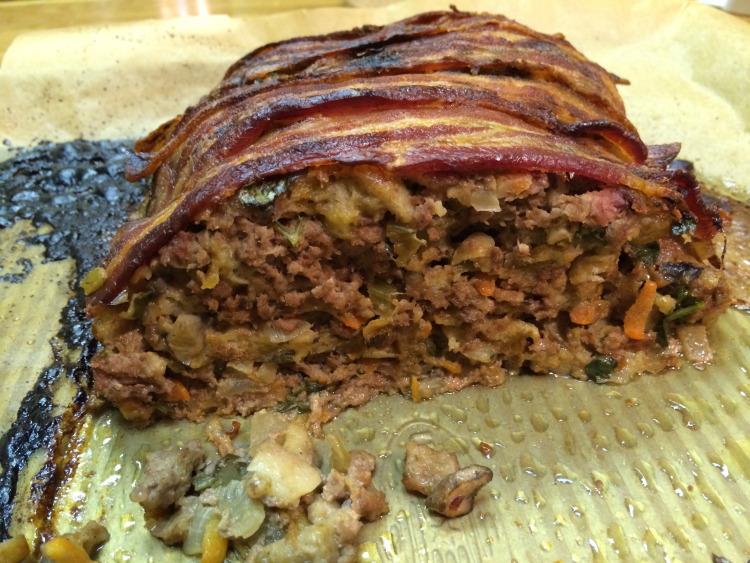
Accompanying the meat loaf was some mashed potatoes (which included some of the bacon fat, plus a couple of handfuls of crushed cooked bacon) and a green bean and garlic recipe that we love (you add fresh lemon zest right at the end).

For dessert, we did not attempt to shy away from bacon. I made some beer-candied bacon (using the same stout that went into the meat loaf) which was served on some vanilla bean ice-cream with a little bit of dark chocolate with sea salt.
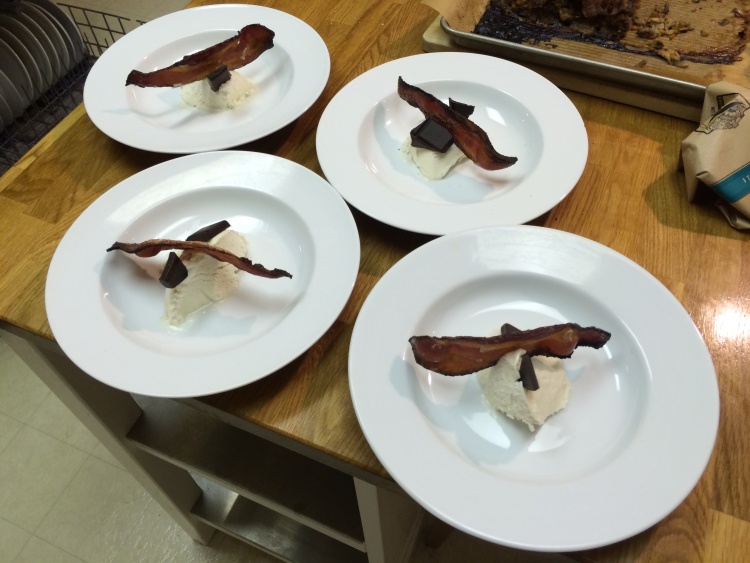

I have never cooked so much bacon in my life! I guess I could have gone the extra step and also prepared a bacon martini but maybe that would have been too much?
Gmail, FastMail, and Mavericks…can't you all just get along?
As a brief interlude to my never ending series of blog posts about migrating from Gmail to FastMail, I'll quickly note that:
a) Gmail has some problems when used as an account in the Mail app of Mac OS 10.9 (Mavericks)
b) FastMail also has some issues when being used with Mail on Mavericks (these would seem to be due to changes Apple made)
So on the one hand, the former news might encourage more people to move away from Gmail but the latter news item means that Apple's Mail app needs some fixes before being ready to work with FastMail under 10.9 (of course, web access to FastMail is unaffected). This is making me consider waiting a little while before upgrading to 10.9.
Update: 31st October
Turns out the 2nd item above was not FastMail's fault and was an issue with a particular user.
Update: 4th November
Marco Arment's piece on the wider issue of Gmail not adopting standard IMAP protocols is well worth a read.
Migrating from Gmail to FastMail: part 5
In this part, I will discuss the changes that I had to make to get FastMail working with my own personal domain.
When I was only using Gmail, I used a personal domain name that I had purchased from the excellent Hover domain name registrar[1]. For just $5 a year, Hover will forward email from a personal email address (using your own domain) to another email account. If I borrow from the fictional example in part 1 of this series, let’s assume I own the domain name mos-eisley-cantina.com and I was previously using Hover to forward mail to greedo@mos-eisley-cantina.com to my Gmail address (greedo_1977@gmail.com). How does this happen with FastMail?
One of the reasons I chose FastMail was that I knew that they supported personal domains[2]. You still get your own FastMail email address as well (and this becomes your account name) but I don't intend to ever use this as an email address.
On following FastMail’s guide to setting up your own domain name I was surprised to find that I had to alter my Hover name server settings for the mos-eisley-cantina.com domain name. I.e. I had to configure Hover to redirect all traffic heading towards mos-eisley-cantina.com to instead go to FastMail’s servers.

I thought I would just be configuring the mail settings at Hover.com rather than redirecting all traffic to FastMail. One of my concerns about this was that I was also using Hover to forward web traffic from mos-eisley-cantina.com to another domain that I own (er…let’s call it wretchedhiveofscumandvillainry.com). As soon as I changed the name server settings in Hover, this forwarding was broken.
I needn’t have worried. Turns out that FastMail provides a lot of options for custom DNS configuration. By visiting Settings->Advanced->Websites/Redirects I could configure my web traffic to be redirected just as before:

So I now have FastMail set up to use my custom domain, though when I set up mail clients such as Apple’s Mail app, I need to use my underlying FastMail email address[3] in the 'User Name' field. To make my custom domain name the default email account, you need to place it first in a comma separated list of email addresses in Apple Mail’s ‘Email address’ field:

- If you want to give me some Hover referral love, please use this link when signing up for a domain (I will get $5 in credit) ↩
- Though you have to sign up for the more expensive enhanced plan to have this feature. On the flip side, I’m no longer paying Hover $5 a year for the email forwarding. ↩
- FastMail provides many different options for your account email address with maybe 50 different domain name extensions (e.g. allmail.net, fastemail.us, myfastmail.com). I went for the default username@fastmail.fm format. ↩
Migrating from Gmail to FastMail: part 4
I’m falling behind on my (seemingly never-ending) series of posts about migrating from Gmail to FastMail. I still have lots that I want to write about, but for this post I’ll point you towards some resources I found helpful, and will briefly discuss FastMail’s IMAP migration tool.
Resources
FastMail provides a lot of really detailed and useful help online. They appreciate that many of you will want to work with FastMail on specific desktop and mobile clients and have created different help pages to address these scenarios. E.g. here is the advice on configuring Apple’s Mail app to work with FastMail folders. Their support team are also very quick to deal with emailed requests.
Here are some guides for migration of Gmail to FastMail:
- The official FastMail migration guide
- A migration guide by readwrite.com (March 2012)
- A short migration overview by Jackson Egan (June 2012)
- An excellent step-by-step guide from Max Masnick (July 2013)
FastMail’s IMAP migration tool
If you decide that you like the free trial of FastMail and want to move to using it 100%, then you will want to bring all of your Gmail (or other email) with you. FastMail has an IMAP migration tool which worked well for me. After logging in to FastMail, navigate to your Account page and select Migrate IMAP under the ‘Maintenance’ settings.

After entering your Gmail credentials, you just let this tool run in the background. It took about 4 hours to copy all of my ~15,000 emails [1]. The best part of this is that it sends you a detailed report when it finishes.
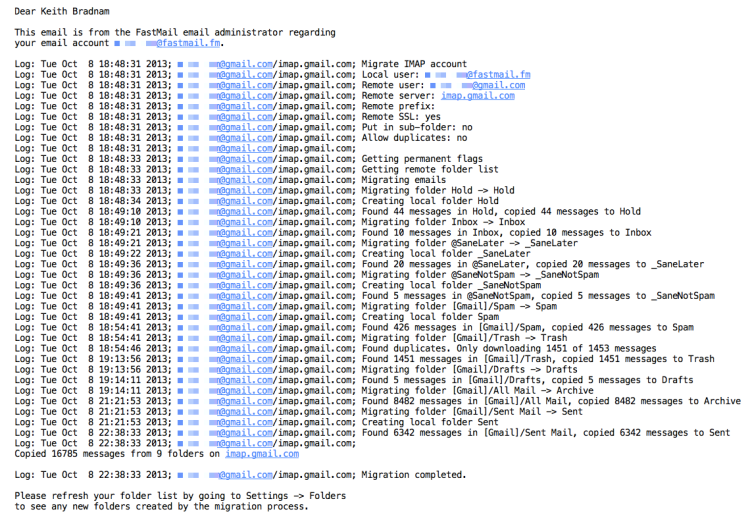
As I mentioned in an earlier post in this series, I was initially confused because my Gmail ‘All Mail’ folder seemed to shrink by several thousand emails. But this is because Gmail — which does many non-standard things with email —counts all sent emails as part of ‘All Mail’. FastMail resolves these into separate folders.
The only hitch in this process was due to my own stupidity. I use SaneBox to pre-filter my Gmail and I needed to tell SaneBox to work with FastMail instead. Foolishly, I did this while my mail was still being imported in the background. This may or may not have been the reason why I ended up with two sets of my SaneBox folders under FastMail. This was easy to resolve though [2].
In my next post, I’ll talk about how I migrated my personal domain settings over to FastMail.
-
It leaves all the original emails in Gmail, so there is no real risk of using this tool. ↩
-
SaneBox gives folders a prefix to make sure that they appear at the top of your list of folders. On Gmail it uses the ‘@’ symbol, but it turns out that different providers sort email folders differently. On FastMail, these folders use a ‘+’ sign (e.g. +SaneLater). During my email migration from Gmail, I also ended up with underscores being used. This gave me a +SaneLater and a _SaneLater folder. I simply moved the contents of _SaneLater into +SaneLater, deleted the former and everything was okay from that point. But really, don’t migrate SaneBox to FastMail until you have finished the Gmail->FastMail migration! ↩
What's in a name? Better vocabularies = better bioinformatics?
About 7:00 this morning I was somewhat relieved because my scheduled lab talk had been postponed (my boss was not around). But we were still having the lab meeting anyway.
About 8:00 this morning, I stumbled across this blog post by @biomickwatson on twitter. I really enjoyed the post and thought I would mention in in the lab meeting. Suddently though that prompted me to think about some other topics relating to Mick's blog post.
Before I knew it, I had made about 30 slides and ended up speaking for most of the lab meeting. I thought I'd add some notes and post the talk on SlideShare.
I get very frustrated by people who rely heavily on GO term analysis, without having a good understanding of what Gene Ontology terms are, or how they get assigned to database objects. There are too many published anayses which see an enrichment of a particular GO term as some reliable indicator that there is a difference in datasets X & Y. Do they ever check to see how these GO terms were assigned? No.