
Migrating from Gmail to FastMail: part 1
I have recently migrated my email setup from Gmail to FastMail. This has not been as simple as moving a single email account from one provider to another, so I thought I’d write about my experiences of getting setup with FastMail.
Before I address the question of why I wanted to move away from Gmail, I thought I would first explain my email setup. In future blog posts, I’ll cover the minor hiccups I’ve had as I’ve switched to FastMail and will also talk about my overall experience of FastMail.
My email setup: the early days of relative simplicity
Like nearly everyone on the Internet (or so it seems), I’ve had a Gmail account for many years. This has not always been my primary account though and I’ve had an Apple-related email service ever since the days of iTools and .Mac. And of course I’ve also had a work email account plus other unwanted-but-necessary email accounts[1].
For a long time, I had these three main accounts (Apple, Gmail, and Work) all connected to my main Mail client (Apple Mail on Macs) as separate accounts.
My email setup: getting more complex
About the time I bought an Android phone[2], I started using Gmail more and more. So that was when I decided to redirect all of my Apple email to Gmail. If you didn’t know, one of the great things about Gmail is that you can connect other accounts to it and send email through Gmail but make it appear that it comes from those other accounts (go to Settings->Accounts):
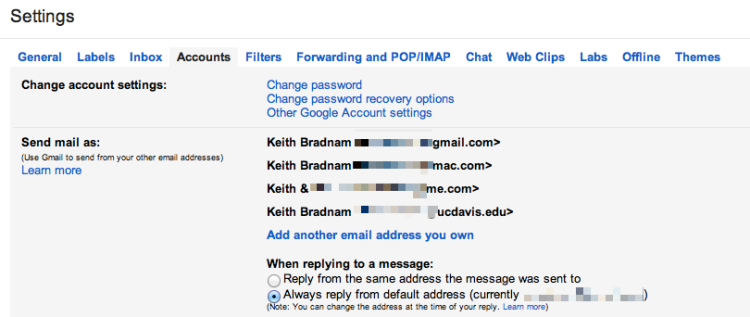
You can even do this for email aliases. My Apple email account lets me set up a few free aliases. This allows me to have one email address that I can use for me and my wife (emails to this account go to me, but get autoforwarded to her[3]). So my Gmail account contained four accounts at this point.
My email setup: fewer accounts, but more complexity
The above configuration works well when using Gmail’s web interface, but initially I thought I had to keep my Work and Apple accounts in my desktop Mail app for those occasions when I wanted to send an email from my Work account. But it turns out, you can have one Gmail account in Apple’s Mail app, and still send from different accounts. You can also do this is in iOS, though you paradoxically have to set up your mail as a non-Gmail account.
My email setup: even more complexity
For a year or so, I was happy with my email setup. Everything was routed to one place (Gmail) but on my Mac or iPhone I only needed to have one account set up and yet I could still send email from my Work or Apple email accounts (including aliases).
At some point though I realized that I might not be with Gmail forever. So I decided to invest in a domain name which, in theory, would stay with me forever and would give me the opportunity to have a stable email address for the rest of my life. This email address could be moved between providers as and when I needed to move.
So I bought a domain name with the awesome Hover registrar (please click here to use my referral link if you consider using them). For $5 a month, Hover will forward email from your chosen email address (e.g. greedo@mos-eisley-cantina.com) to another address. So while I could have used Hover as the email host, I decided to stick with Gmail and just forward email to it as before.
So how did I end up being able to send from my new address (greedo@mos-eisley-cantina.com[4]) from within Gmail or Apple’s Mail clients? Well in Gmail, you can add other accounts to your account and either treat them as an alias or make them the default account:
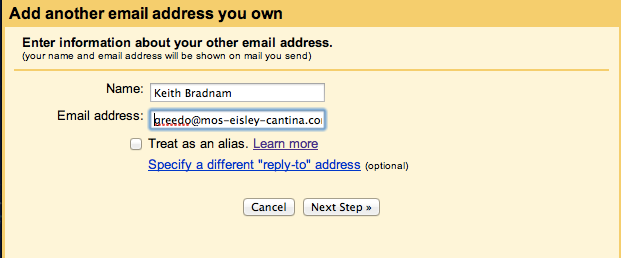
So in my case, I made greedo@mos-eisley-cantina.com the default email address associated with my Gmail account. Setting this alias to be the default email address for your Gmail account in Apple’s Mail clients is trickier, especially on iOS. But it can be done.
Moving on
Over the last few days I have finally decided to leave all of the above setup behind and move to FastMail. Why and how I did this, will be the subject of future blog posts in the coming days. However, my early experience is that FastMail is excellent and I have no regrets about making this move.
-
Comcast (my ISP) required me to setup an email account. I never use this but forward the billing-related email announcements on to my main accounts. Also, I have a Yahoo email account which is solely because of the Fantasy Football league that I play in. ↩
-
My Android experience lasted about a year, I’m now an iPhone user ↩
-
You can setup a filtering rule in Gmail to do this ↩
-
This is not the address I am using! ↩
A new type of email annoyance, it's not quite spam or bacn, but what is it?
I understand that companies want to keep in contact with their customers. But the volume of email a company sends should hopefully be proportional to how often you purchase, or use services, from that company. An email every few months is one thing. When you start emailing every few weeks, it becomes bacn, and when you email me every week it is spam and I will delete it, ignore it, or unsubscribe from your emails.
Recently, I've been getting a lot of emails that look like this one:
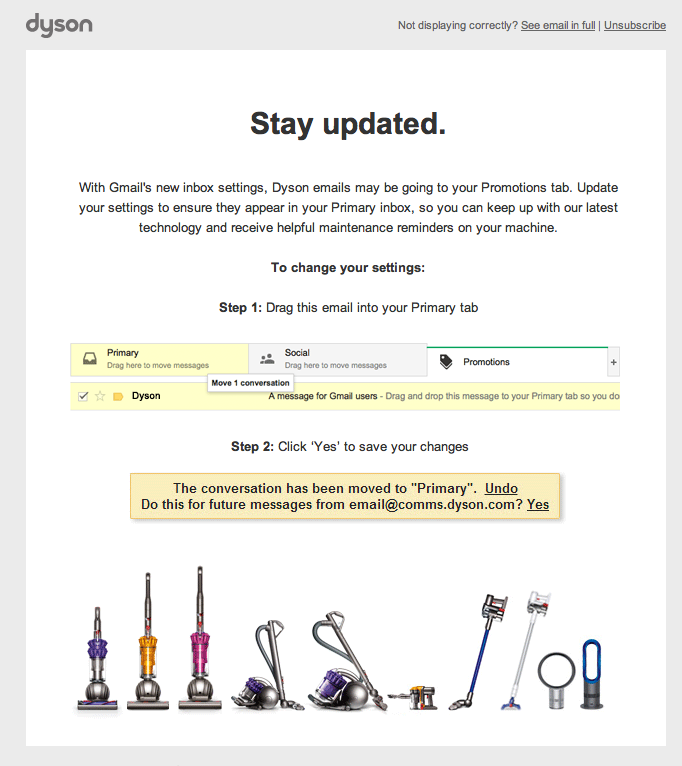
Ever since Google rolled out their new inbox for Gmail, some companies have started to worry that we might not giving their emails the amount of attention that they would prefer. If I were in charge of a company's email strategy, I would let the customer make their own mind up as to whether the email was important or not. I would not send the customer even more emails to tell them how to prioritize the emails that the company sends.
A name is needed for this annoyance. How about 'facn' for fake bacn?
Thinking of migrating your older Squarespace sites to Squarespace 6? A cost-benefit analysis
I have been using Squarespace for a few years now to host the few websites that I maintain. Last July, Squarespace released the latest version of their software: Squarespace 6 (which I will refer to as ss6 from now on). While I mostly prefer the changes that have been made in ss6, I've put off migrating all of my sites. This is partly through laziness, but partly because I've been confused as to how the pricing differences with Squarespace 5 (ss5) will affect me.
Luckily, Squarespace has fantastic support, and so I emailed them and they revealed all. I thought that others, who are also thinking of migrating, might find their answers to my questions useful. My original email is below, and I've interspersed their answers. A brief summary follows that.
My email exchange:
Background
Currently I have one master Squarespace 5 (ss5) account, two Squarespace 5 sub-accounts, and one Squarespace 6 (ss6) account that — if I understand this correctly — remains free while connected to my master ss5 account. I also have plans to start a fifth Squarespace site and trying to decide whether to migrate any or all of them to ss6 is the cause of my confusion. So here are my questions:
Question 1
With the 15% discount I get for the three ss5 accounts, this currently costs me $25.50 per month (the ss6 account remains free). If I migrated all accounts to ss6, would this end up costing me a flat fee of $8 per month (standard accounts, billed annually) for each account? I.e. a total cost of $32 for the current accounts I own ($40 if I create a new ss6 account)? I haven't seen any mention of discounts for managing multiple ss6 accounts.
There are not any special discounts for multiple sites associated with the same email address. You will need to upgrade each account individually. Also when you pay for an annual account you pay for the whole year right away totaling to $96 per account
If you decide to go for monthly billing you will be paying $10 per month
You can refer here form more information on our paid plans: http://help.squarespace.com/customer/portal/articles/1257605
Question 2
Under ss6, I understand that all accounts can be tied to a single email address which is fine, but is all the billing centralized as well, or would this be 4 or 5 separate payments off of my credit card?
All of you accounts would be billed separately
Question 3
If I went ahead and migrated everything to ss6, I guess I'd have to start with my master account. So I assume that initially I'd create a new ss6 account (which would have to have a new name?) and then I would import the ss5 content to it and finally redirect my domain name to the new site. Once I have the new ss6 master account I could connect other ss6 accounts to it, but my one current ss6 account is tied to my ss5 master account. The question here is whether everything will be okay if I disconnect the current ss6 account from the master ss5 account and then reattach it to the new master ss6 account?
There is no such thing as a master account within V6. All Squarespace 6 sites are managed individually. You are, as mentioned earlier, able to have several sites associated with the same email address.
When you unlink your Squarespace 6 site from your old Squarespace 5 account it will now function as its own independent site. You will not need to link it to anything else
So the bottom line is that Squarespace 6 removes the concept of centralized billing for multiple accounts. So this also means no multiple account discount. Without that discount, ss6 sites are 50 cents cheaper per month than ss5 (assuming you pay for a year at a time). But, I currently have one free ss6 account which would no longer be free if I get rid of the ss5 sites.
So if I moved my three current ss5 sites to ss6, I'd end up with four ss6 sites which would work out to $32 per month...a ~25% increase on what I currently pay. Hmm, still not sure whether the extra features in Squarespace 6 will tempt me to switch.
The never-ending quest to rate and organize my iTunes library - part 2 of 2
In part1 of this blog post, I indicated that I had been rating the music in my iTunes library for about 8 years. Having thought about this some more, I think its probably been at least a decade. But after all of that time, I am finally finished! For the last four years I've kept track of how many songs remained in my 'To Rate' playlist, and so I can graphically show you how I finished this very long marathon.

Here is an explanation for the various milestones along the way to having no unrated songs remaining in my library.
a) January 2009 At this point I was only rating music that I had purchased (CDs, iTunes, and Amazon) and had just over 1,500 songs left.
b) August 2009 I tend to buy CDs in splurges rather than regular purchases every week or so. This jump probably represented about 10 new CDs. Most of the small spikes on this graph represent new music purchases.
c) February 2010 Finished! All of my purchased music had been rated...but what about all of the other music in my library which I had legally acquired for free. How much could there be?
d) February 2010 Well quite a lot as it turns out. Since 2005, the South by Southwest festival (SXSW) has provided free torrents of music by people performing at SXSW (one song per artist). If you didn't know, a lot of artists play at SXSW and these torrents are big. You can still get hold of all torrents from this site. The current running total is about 9,000 songs (45 GB!) and every year the torrents seem to get bigger.
These torrents are usually provided as two files, with the second one being smaller (and released a little bit after the first file). So this big spike represents me starting to rate 5 and a half years of SXSW music. Sidenote: a shout out to Danny Novo who had made some cool SXSW iTunes album artwork every year that the torrents have been available.
e) March 2010 I think this smaller spike represented the second of the two 2010 SXSW torrent files, with the majority of the SXSW music included in the previous huge spike.
f) and g) February & March 2011 The two SXSW torrents for 2011. You may note that initially I seem to rate the music very quickly and then it slows. This is because I tend to sort the yearly SXSW torrent by song length. Songs that are extremely short (< 1 minute) or extremely long (>7 minutes) tend to be music that I don't like and I can quickly process these. I have also found that songs that feature 'death' in the song title, or 'black' in the artist name are also not to my liking. Finally, I am not a fan of rap music so artists with 'MC' or 'DJ' in their name can also be quickly filtered.
h) March 2012 SXSW 2012.
i) August 2012 A bunch of new CD purchases.
j) January 2013 I think I had finished all of the SXSW music at this point, but then discovered a whole bunch of previously purchased music that had slipped through the cracks (pretty much of all of my classical music), plus I also had another bunch of new CDs to rate.
k) March 2013 SXSW 2013.
l) April 2013 Each year I get quicker at doing the initial pass of that year's SXSW torrent, and I think you can see how quickly I go through the long/short/black/death/rap songs (see steps f) and g) above).
m) August 2013 Finished. Done. The End. No more rating. right?
What now?
The SXSW torrents represent a real mixed bag of music. If you drove coast-to-coast and kept on randomly flipping through radio stations — preferably college radio stations, there is not much mainstream pop music at SXSW — it would get close to the experience of listening to a SXSW torrent. So unlike the music that I buy, where I have pre-selected albums based on one or more songs that I have heard and that I like, the SXSW music provides no such guarantees.
What tends to happen is that I discover a bunch of new artists through songs that I really love. However, a large swathe of SXSW music is either not to my taste, or is just a bit 'meh'. In fact, I realized that I had ended up with about 1,500 2-star rated songs from my SXSW torrents. While having some 2-star songs in the middle of a CD that own is one thing, these 2-star SXSW songs represent a potential waste of disk space.
As I am a iTunes Match user, I deleted all of these songs from my iTunes library (after ensuring that they had first been matched by iTunes). This frees up some disk space but means I can still play these songs and download them again if I really want them.
However, it still irks me a little to know that these 2-star songs are part of my library, even if they are not taking up any space. So because I am a masochist, and because I can't abide to delete them all in case there are some gems buried amongst them, I decided to re-rate all of these songs. If I decide that I really do like a song, I upgrade it to a 3-star rating. Otherwise I permanently delete it (removing it from iCloud). So far, I've processed about 200 songs and it will probably take me several more months before I finish this.
And then I am done.
Really done.
Until the next SXSW!
The never-ending quest to rate and organize my iTunes library - part 1 of 2
This is a blog post that I've been intending to write for many, many years. The final impetus for getting on with it was seeing David Sparks write about how he rates his music in iTunes. Before I reveal the minutiae of how I rate my own music — a system which is very similar to David's — I should give some background to my music collection and my long attempt at organizing it.
My music
I consider that I own a fair amount of music. I think that the new standard to be used when deciding if you own a lot of music, is whether you find iTunes Match's 25,000 song limit restrictive. Currently, I have 13,275 items in my iTunes library. These include:
- 9,715 songs ripped from CDs I own
- 2,209 songs from free SXSW downloads (more of this in part 2)
- 840 songs purchased from iTunes
- 121 songs purchased from Amazon MP3 store
- 70 songs that were available as free downloads (predominantly from artists websites)
- 35 self-recorded songs or musical sketches
- 23 audiobooks
- 22 podcasts (I mostly use Downcast to manage podcasts)
- 2 E-books (I mostly buy Kindle books)
I can be so precise about this breakdown because I use a set of custom 'tags' for nearly all items in my iTunes library. These tags simply consist of adding text to the 'Comments' field of tracks; I use tags such as [CD], [ITUNES], [AMAZON] etc. The addition of square brackets makes it very unlikely that this text will exist anywhere else in a comments field. It also makes it easy to include as part of a Smart playlist. I'm curious whether the tagging feature of OS X Mavericks will allow tagging of songs in iTunes, which might mean I can replace these comments.
An alternative way of categorizing my music is to break it down by decade of recording. I try to change the dates on tracks to the original recording dates rather than the date that the CD/album was issued. This is mostly a problem for older music that only exists on iTunes from compilation albums or re-issues.
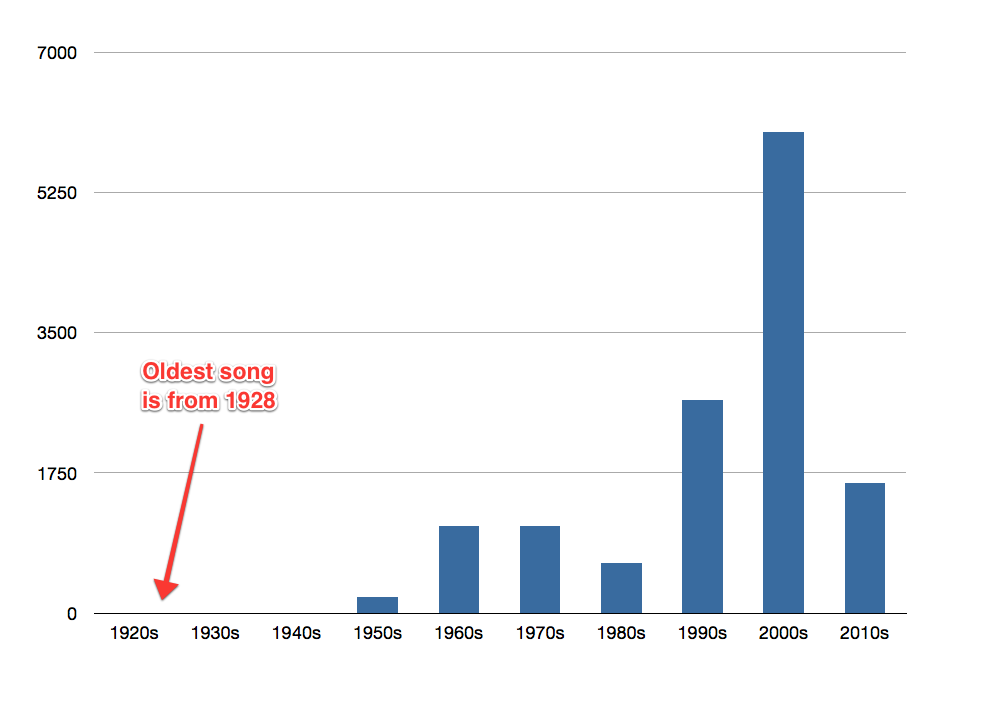
I think this represents a good spread across the decades (maybe Jazz fans would beg to differ). Another way of looking at this is that 11% of the music that I own was recorded before I was born (1971).
Rating songs
I've been using iTunes ever since I purchased my first Mac in 2001 (the era of rip, mix, and burn). I started ripping CDs from around this time, slowly working my way through my CD collection. At some point (maybe around 2005) I started to systematically rate my songs as follows:
1 Star - 2.8% of my library
Things I never want to hear. This sometimes include songs that I really don't enjoy on albums that I otherwise like (typical culprits being low-quality live tracks, or extremely long and unfocused instrumental jams). However, it mostly includes things like silent tracks that are used as interludes on some albums, or spoken tracks (think of all the classic radio DJ interludes on the Reservoir Dogs soundtrack). Giving all of these tracks 1 star means I can create smart playlists that will never randomly shuffle between music and spoken word (or silence).
2 Stars - 44.2% of my library
Songs that I am largely indifferent to. On a good day I might be in the mood for a 2 Star song, but on a bad day I might be offended by one. This category represents a large slice of my iTunes library, reflecting my opinion that there are many great songs which exist on largely mediocre albums (and I like to buy albums rather than individual songs). Perhaps my tendency to down-rate rather than up-rate songs is reflected by the fact that out of about 750 full-length albums, I have only 33 with an average rating greater than 3.5 stars (I have a Perl script that generates average ratings).
3 Stars - 44.2% of my library
Currently, I have almost an identical number of 2 star and 3 star songs. A 3 star song must have at least one great quality about it. This could be the lyrics, the melody, or even the performance of a single instrument. Often it is just a good hook in part of the song, or just the energy that the song imparts. I pretty much always enjoy listening to a 3 star song, but I wouldn't want to listen to the same song over and over again.
4 Stars - 7.9% of my library
There is a big drop in the number of songs that make it to this level. A 4 star song must be amazing. It must have at least two or three great qualities about it and I will almost never tire of hearing a 4 star song. The things that stop them becoming a 5 star song could be something minor, but something that might seep through into my consciousness when I listen to it (a song that outstays its welcome, a bad note in one part that can be jarring, or a single line with a flawed lyric).
5 Stars - 1.2% of my library
These songs represent songs that I find exceptional in almost every way. Usually I find them to have a stunning combination of lyrics and music, with fantastic vocal and instrumental performances. Furthermore I find these songs to have superb production values, with great arrangements and pristine sound (letting you hear details of every instrument on the record). In nearly all cases, I find these songs to be flawless. There is nothing about them that I could imagine being improved. It perhaps reflects my overall preferences for what I might broadly define as 'classic pop/rock' that 90% of these songs are less than 5 minutes long. My iTunes library does comprise genres such as Jazz, Classical, and Prog Rock, but they reflect a small proportion of the music that I own.
Finally, I should add that I will often listen to a song 10 times or more before making my mind up as to what the most suitable star rating should be. This, coupled with the tendency to keep on buying new music, is the major reason that it has taken me almost a decade to finish rating my entire iTunes library. My progress in getting there will be explored in part 2, along with a few comments on the challenges provided by the free SXSW downloads, and the question that now looms large on my horizon:
Once you have finished rating the entirety of your 13,275 song iTunes library, what do you do next?
Not So Breaking News

A new idea for some blog posts to single out some examples of 'Breaking News' services that bring us 'news' which is barely worth calling news, let alone breaking news. First offender is from the Breaking News twitter account which today gave us this:
Report: Apple is evaluating plans to offer iPhones with screens up to 6 inches - @WSJ http://t.co/reVDoFcVMg
— Breaking News (@BreakingNews) September 5, 2013
So Apple is 'evaluating' plans to offer iPhones with screens up to 6 inches. When you click through to the Wall Street Journal story, it reveals the source of this 'breaking news' as people familiar with the matter.
I have no doubt that that might be true, but only in as much that Apple is probably also 'evaluating' iPhones that are thinner, fatter, lighter, and heavier. For all we know, Apple might be 'evaluating' iPhones that come with a free pony as well.
In any case, it is vague speculation from an unnamed source about a possible plan that, even if it happens, would almost certainly not take place until a year from now. Whatever this story is, it hardly seems to constitute 'breaking news'.